Creator Guide
How to Release an AI Song From Start to Promotion
A practical, end-to-end workflow for writing, generating, mastering, distributing, promoting, and monetizing an AI-generated song.
This is a simple, end-to-end workflow for releasing an AI-generated song based on real usage, not theory.
It covers the full process: from writing lyrics, to generating the track, to distribution, promotion, and monetization.
If you want a platform built specifically for publishing and discovering AI music, Amazing AI Radio is one of the places where that release workflow can continue after the song is finished.
The tools are accessible. What matters is how you combine them.
Step 1: Start with lyrics
Even with AI, the lyrics still carry the song.
Focus on:
- a clear idea or story
- a strong, repeatable chorus
- simple phrasing that is easy to remember
Avoid overly generic lines. Specific details and a clear emotional angle make a big difference.
A useful check: read your chorus out loud. If it sticks after one pass, you are on the right track.
Step 2: Generate the song
Use a tool like:
- Suno
- Udio (alternative)
Do not stop at the first result.
Instead:
- generate multiple versions
- tweak the style prompt
- adjust small parts of the lyrics
Most of the time, the difference between an average track and a strong one is just a few iterations.
Step 3: Export and master the track
Download the highest quality version available, ideally .wav.
Then master it using:
Some distributors and services offer built-in mastering, but external tools usually give you more control.
Listen to your track on:
- headphones
- phone speakers
- car speakers
If it translates well across all of them, you are ready.
Avoid pushing loudness too far. AI tracks are often already compressed, and overdoing it can remove clarity.
Step 4: Create cover art
You will need square artwork, typically at least 3000×3000 pixels.
You can generate it using AI tools such as:
- Midjourney
- DALL·E
- Gemini image generation
If needed, upscale it here: upscale.media.
Keep the design simple:
- strong contrast
- minimal text
- readable at small sizes
Step 5: Plan your release
Use a distributor like DistroKid.
Timing
- If you set your release date at least two weeks in advance, you can pitch the track to Spotify playlists.
- Otherwise, releasing a few days ahead is fine. Friday is still a common release day.
Metadata
Fill everything carefully:
- title
- artist name
- genre
- artwork
Add lyrics when possible.
Some distributors now include options to indicate AI-assisted content. It is a good idea to be accurate in your metadata to avoid issues later.
Step 6: Create a hook video
Short-form content is what drives discovery.
Basic process:
- Generate visuals
- tools like Veo, Runway, or similar
- use your lyrics and a reference image
- Edit
- crop to vertical (9:16)
- use tools like CapCut
- Add audio
- use the strongest part of your chorus
- tools like CapCut, iMovie, or ffmpeg
Keep it short and direct. The first few seconds matter the most.
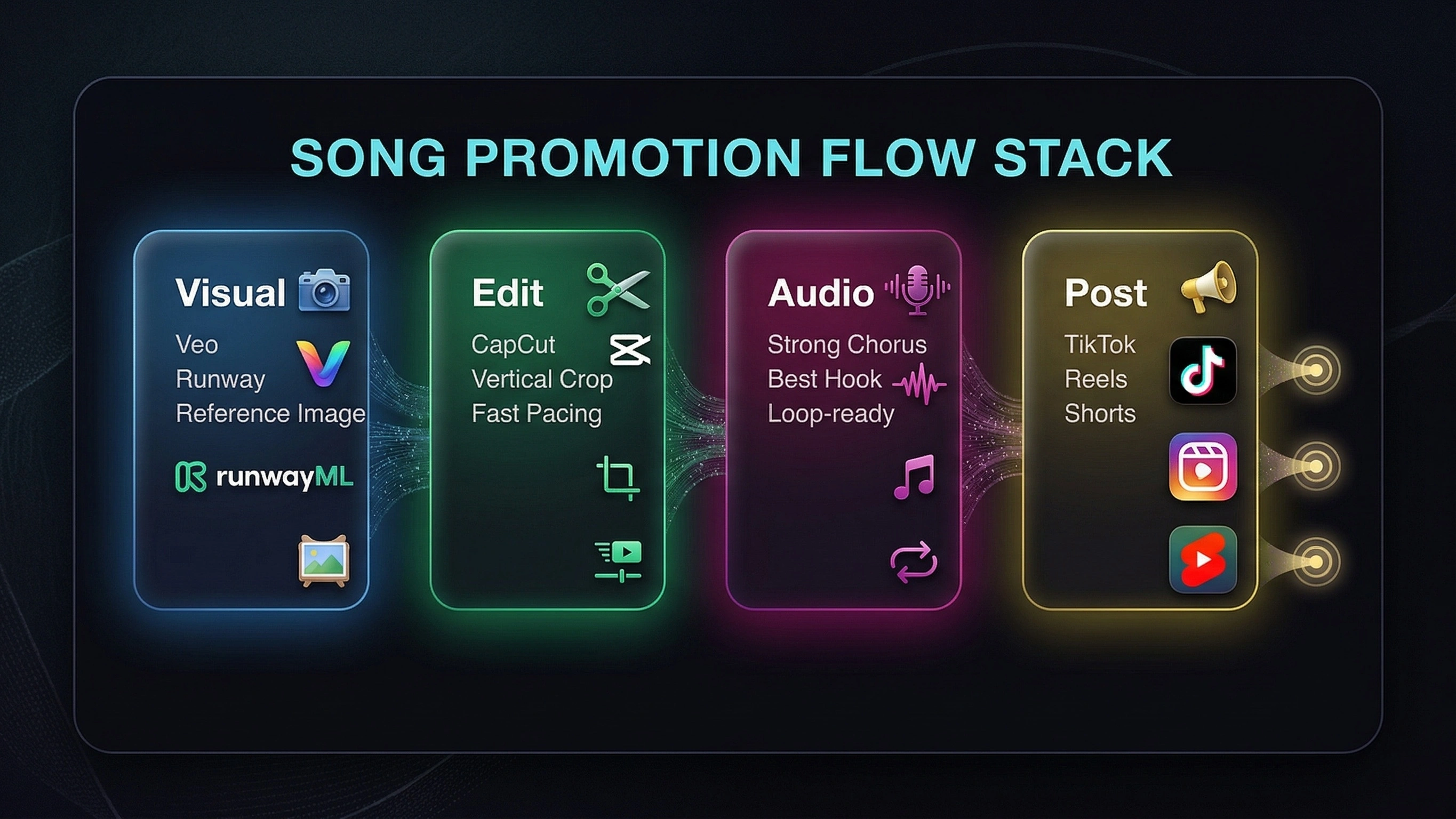
You can reuse this video as a Spotify Canvas. It is a short looping visual that plays while your track is streaming and can increase engagement.
Step 7: Promote before release
Before your track goes live, prepare your promotion.
Spotify pitch
Use Spotify for Artists.
Log in, go to your upcoming releases, and submit your track for playlist consideration.
Social platforms
Post your hook video on:
- TikTok
- Instagram Reels
- YouTube Shorts
- X
Do not rely on a single post. Consistency matters more than perfection.
Step 8: After release
Once your track is live:
Add lyrics to Spotify
Use Musixmatch.
This helps your lyrics appear inside Spotify and other platforms.
Pitch to Amazon Music
Use Amazon Music for Artists to submit your track to playlists.
Create additional content
Post more clips using:
- different parts of the song
- different visuals
Many tracks only start gaining traction after several posts.
Step 9: Claim your artist profiles
After your first release, claim your accounts:
- Spotify for Artists
- Apple Music for Artists
- Amazon Music for Artists
- TIDAL
- Deezer
This gives you access to analytics and control over your artist profile.
Step 10: Publish on additional platforms
Do not rely only on streaming platforms.
Also publish your track on:
Platforms like Amazing AI Radio are especially useful because they put your music directly in front of an audience specifically looking for AI-driven innovation, which can lead to faster feedback than the “black box” of Spotify algorithms. If you are comparing upload options, you can also review the current plans and publishing limits.
Step 11: Promotion beyond platforms
Look for additional exposure:
- online radio stations
- playlists
- contests
- collaborations
Growth usually comes from multiple small channels, not one big push.
Monetization beyond streams
Streaming revenue is only one part of the picture.
Performance royalties
Organizations like BMI collect royalties when your music is:
- played publicly
- broadcast
- performed
Register here: BMI.
Digital performance royalties
SoundExchange collects royalties from:
- digital radio
- non-interactive streaming
Register here: SoundExchange.
Distributor earnings
Your distributor, such as DistroKid, collects revenue from:
- Spotify
- Apple Music
- YouTube Music
Final thoughts
Most AI songs do not gain traction from streaming platforms alone.
The real growth usually comes from short-form content and consistent releases.
The advantage of AI music today is speed. You can create, publish, test, and improve quickly.
The creators who grow are the ones who keep releasing and refining their process.
If you want to keep learning, browse more creator guides, see what listeners are discovering on the charts, or review the current artist plans before your next release.